

An SEO audit guide is the essential starting point for any business that wants to improve its search engine rankings in 2026. Whether your organic traffic has plateaued, dropped after a Google algorithm update, or you simply want to identify opportunities for growth, a comprehensive SEO audit reveals exactly what is working, what is broken, and what needs to change.
Too many businesses treat SEO as guesswork — publishing content and building links without understanding the technical foundation their website sits on. An SEO audit replaces guesswork with data-driven analysis. It examines your technical infrastructure, on-page optimization, content quality, backlink profile, and competitive positioning to create a prioritized roadmap for improvement.
At Webdo Solutions, every client engagement begins with a thorough SEO audit. This systematic approach is how we consistently deliver results like a 362 percent traffic increase for Lopez Law Group and 4.73 million impressions for Dallas Parrots. Request your free SEO audit today.
Need a professional SEO strategy tailored to your business?
Get a free SEO audit from Webdo Solutionsand find out where you stand today.
What Is an SEO Audit?
An SEO audit is a comprehensive analysis of a website’s search engine optimization health. It evaluates technical infrastructure, on-page elements, content quality, backlink profile, and competitive positioning to identify issues that prevent a site from ranking at its full potential. The audit produces a prioritized list of fixes and opportunities that, when implemented, improve the website’s visibility in both traditional and AI-powered search results.
Why Every Business Needs a Regular SEO Audit
SEO is not a set-and-forget activity. Websites accumulate technical issues over time, Google updates its algorithms regularly, competitors adjust their strategies, and user behaviour evolves. Here is why regular auditing is critical.
Websites Degrade Over Time
Every time you add a new page, update a plugin, change a theme, or restructure navigation, you risk introducing SEO issues. Broken links accumulate. Page speed degrades as new scripts and images are added. Redirect chains grow longer. Metadata gets duplicated or lost. Without regular audits, these small issues compound into significant ranking problems.
Algorithm Updates Change the Rules
Google releases thousands of algorithm changes each year, including several major core updates. Each update can shift what Google values and how it evaluates content. An SEO audit identifies whether recent algorithm changes have affected your site and what adjustments are needed to align with current ranking criteria.
Competitors Do Not Stand Still
Your competitors are actively improving their SEO. New competitors enter your market. Existing competitors publish better content, build stronger backlinks, and optimize their technical infrastructure. An SEO audit benchmarks your performance against the current competitive landscape, not the landscape from when you last checked.
Technology and User Behaviour Evolve
In 2026, websites need to be optimized not just for Google but also for AI search engines like ChatGPT, Gemini, and Perplexity. An SEO audit now includes evaluating your visibility in these AI-powered search platforms — a dimension that did not exist just two years ago.
Tools You Need for a Comprehensive SEO Audit
Before starting your audit, assemble these tools. Most offer free versions or trials that are sufficient for an initial audit.
Google Search Console — Free. Provides crawl data, indexation status, mobile usability issues, Core Web Vitals data, and keyword performance directly from Google. This is your most important data source.
Google Analytics — Free. Provides traffic data, user behaviour metrics, conversion data, and audience demographics. Use GA4 for the most current data model.
Screaming Frog SEO Spider — Free for up to 500 URLs, paid for larger sites. Crawls your website like a search engine, identifying technical issues including broken links, duplicate content, missing metadata, and redirect chains.
PageSpeed Insights — Free. Evaluates Core Web Vitals and page load performance with specific recommendations for improvement.
Ahrefs or SEMrush — Paid. Provides backlink analysis, keyword rankings, competitive analysis, and content gap identification. Either tool works; choose based on preference and budget.
Schema Markup Validator — Free. Tests your structured data implementation using Google’s Rich Results Test.
Phase 1: Technical SEO Audit
Technical SEO forms the foundation of your entire search strategy. If search engines cannot properly crawl and index your website, no amount of content or link building will help.
Crawlability Analysis
Start by checking whether search engines can access and crawl all important pages on your website.
Robots.txt review. Access your robots.txt file at yourdomain.com/robots.txt. Verify it is not accidentally blocking important pages, CSS files, or JavaScript resources. A misconfigured robots.txt can prevent Google from seeing entire sections of your site.
XML sitemap audit. Verify your XML sitemap exists, is referenced in robots.txt, is submitted in Google Search Console, includes only indexable pages with 200 status codes, excludes noindexed and redirected pages, and is under the 50,000 URL limit per sitemap file.
Crawl budget analysis. For larger websites with over 10,000 pages, crawl budget becomes a factor. Check your crawl stats in Search Console to see how frequently Google crawls your site. Remove thin, duplicate, and low-value pages from Google’s crawl path to ensure your crawl budget is spent on high-value pages.
Indexation Check
Having your pages crawled does not guarantee they are indexed. Check indexation through several methods.
Site: search operator. Search “site:yourdomain.com” in Google to see how many pages are indexed. Compare this number against the number of pages you expect to be indexed.
Search Console Coverage report. The Coverage report shows which pages are indexed, which are excluded, and why. Pay special attention to pages marked “Discovered – currently not indexed” and “Crawled – currently not indexed” — these indicate Google found your pages but chose not to index them, often a quality signal.
Index bloat. If Google has indexed significantly more pages than you intend — including parameterized URLs, filtered pages, tag archives, or internal search results — you have index bloat. This dilutes your site’s overall quality signals. Consolidate or noindex low-value pages.
Site Speed and Core Web Vitals
Run every important page through PageSpeed Insights and record the Core Web Vitals scores.
Largest Contentful Paint (LCP) should be under 2.5 seconds. Common fixes include optimizing hero images, implementing efficient image formats like WebP, using preload for critical resources, and improving server response times.
Cumulative Layout Shift (CLS) should be below 0.1. Common fixes include setting explicit dimensions on images and embeds, reserving space for ad units, and avoiding dynamically injected content above the fold.
Interaction to Next Paint (INP) should be below 200 milliseconds. Common fixes include breaking up long JavaScript tasks, deferring non-critical scripts, and minimizing main thread work.
At Webdo Solutions, technical speed optimization is a core part of every website project. The performance gains directly translate into better rankings and higher conversion rates.
HTTPS and Security
Verify your entire site serves over HTTPS with a valid SSL certificate. Check for mixed content issues where the page loads over HTTPS but references resources (images, scripts) over HTTP. Mixed content triggers browser security warnings and can affect rankings.
Mobile Usability
Run your key pages through Google’s Mobile-Friendly Test and review the Mobile Usability report in Search Console. Check for text too small to read, clickable elements too close together, content wider than the screen, and viewport not configured correctly.
URL Structure and Redirects
Audit your URL structure for consistency and optimization. Check for redirect chains (A redirects to B, which redirects to C — these should be consolidated to A redirects to C), redirect loops, inconsistent URL formats (some with www, some without; some with trailing slashes, some without), and 404 errors on pages that should exist.
Phase 2: On-Page SEO Audit
With technical foundations solid, evaluate how well individual pages are optimized for their target keywords.
Title Tag Analysis
Export all title tags from your crawl and check for missing title tags on any indexable page, duplicate title tags across multiple pages, title tags exceeding 60 characters (truncated in search results), title tags missing the primary keyword, and title tags that fail to include compelling language that drives clicks.
Meta Description Audit
While meta descriptions are not a direct ranking factor, they significantly influence click-through rate, which does affect rankings. Check for missing meta descriptions, duplicate meta descriptions, descriptions exceeding 160 characters, descriptions that fail to include a call to action, and descriptions missing the primary keyword.
Heading Structure
Examine the heading hierarchy on each important page. Every page should have exactly one H1 tag containing the primary keyword. H2 and H3 tags should follow a logical hierarchy. Headings should not skip levels — H1 to H3 without an H2 is incorrect. Each H2 should target a semantic keyword relevant to the page topic.
Content Quality Assessment
Evaluate your content against the standards that Google’s helpful content system uses. Check for thin content (pages with less than 300 words that offer little value), duplicate or near-duplicate content across pages, outdated content with old dates, statistics, or references, content that fails to satisfy search intent for its target keyword, and pages lacking E-E-A-T signals like author attribution, dates, and credentials.
Image Optimization
Audit all images for missing alt text (screen readers and search engines cannot understand the image), non-descriptive filenames like “IMG_1234.jpg” instead of “seo-audit-checklist.webp”, oversized images that slow page load, and images not in modern formats like WebP.
Internal Linking
Internal links are one of the most powerful and underutilized on-page SEO elements. Audit your internal linking structure for orphan pages with no internal links pointing to them, key service pages not receiving enough internal link equity, generic anchor text like “click here” instead of descriptive keyword anchors, and broken internal links pointing to 404 pages.
Every blog post should include a minimum of five internal links to relevant service pages, portfolio pages, and related blog content. This structure is critical for both search engine crawlability and user navigation.
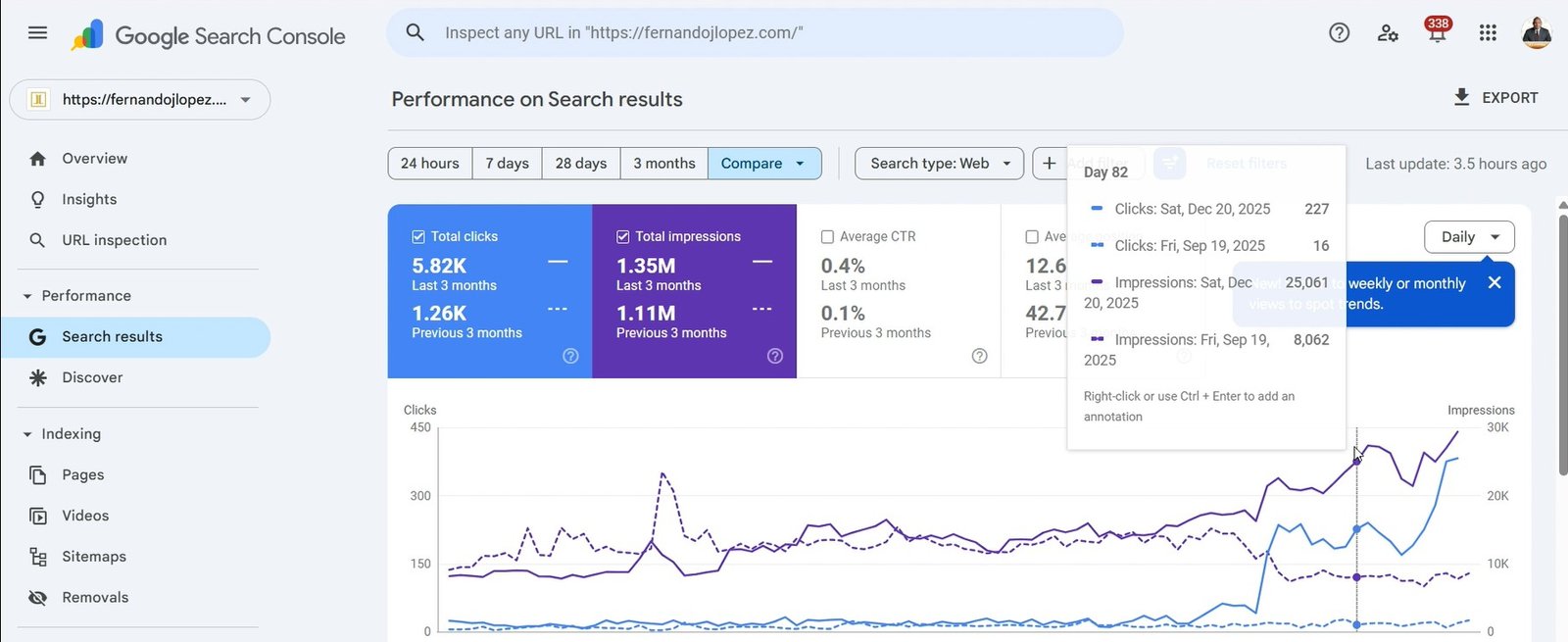
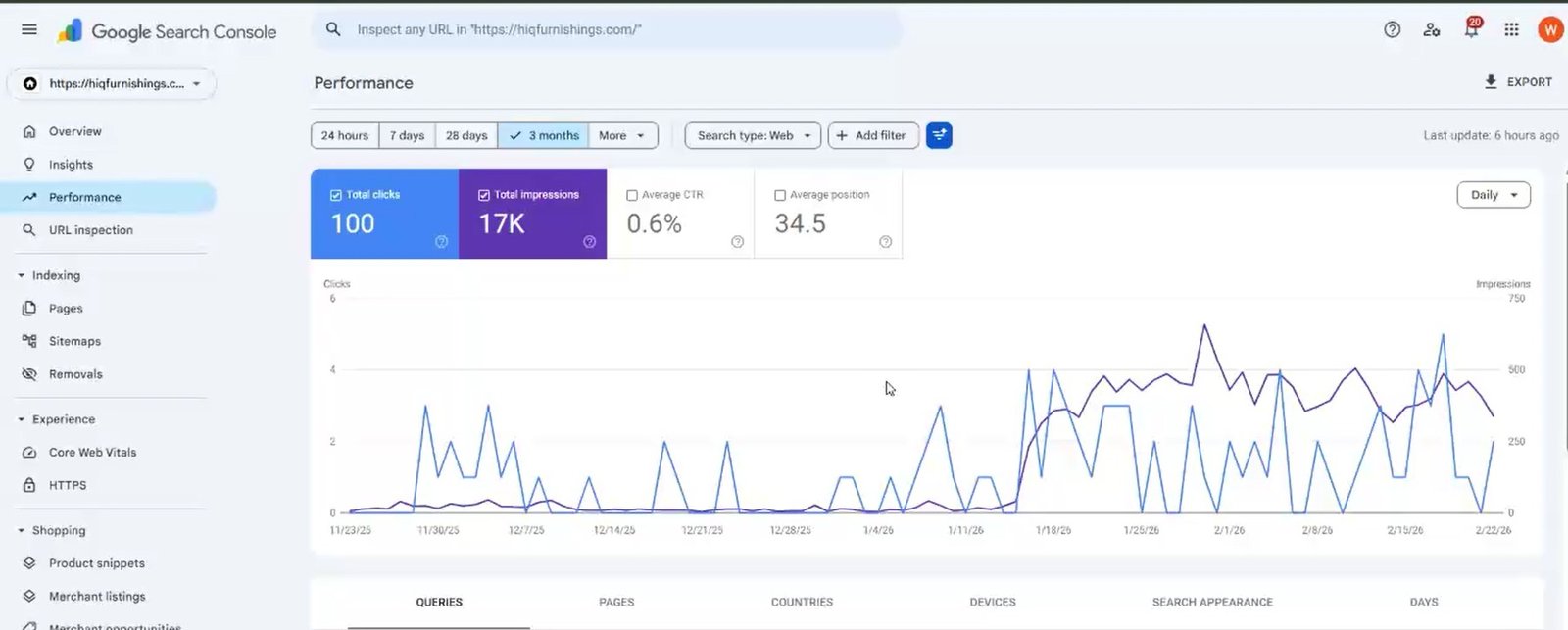
Verified Search Console Extractions & Stats
Live metrics and performance comparisons extracted directly from Google Search Console campaign proofs.

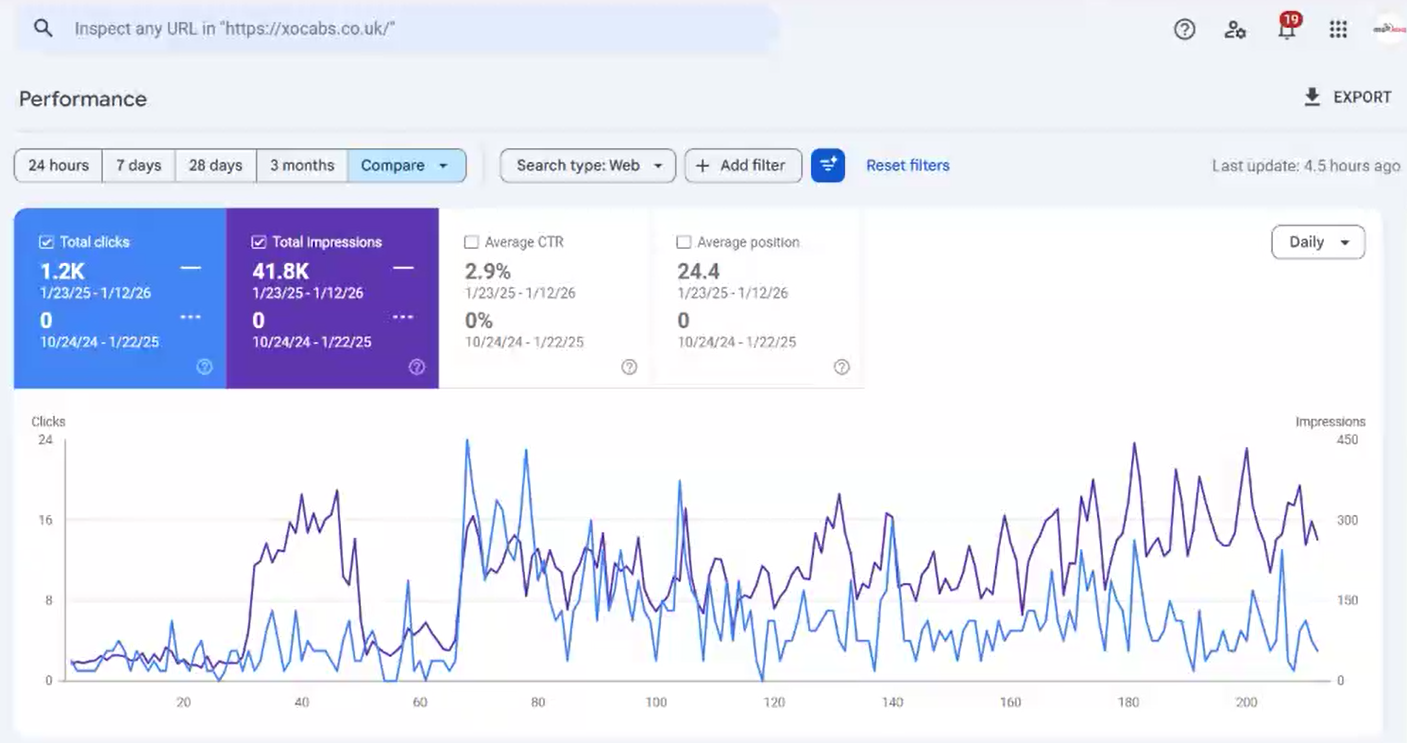
| Client Project | Market | Primary Metric Extracted | Starting Baseline | Achieved Result |
|---|---|---|---|---|
| Dallas Parrots | USA | Impressions | 219K | 4.73M |
| Lopez Law Group | USA | Impressions / Clicks | Baseline | 1.35M Impressions (+362% Clicks) |
| Hiq Furnishings | UK | Impressions (90 Days) | 0 | 17K Impressions |
| XO Cabs | UK | Clicks & Impressions | Baseline | 1.2K Clicks / 41.8K Impressions |
Phase 3: Content Audit
A content audit evaluates your entire content library to identify what is performing, what needs improvement, and what should be removed or consolidated.
Content Inventory
Create a spreadsheet listing every indexable page on your site with its URL, title, primary keyword, word count, organic traffic (last 90 days), organic keywords ranking, backlinks, and last updated date.
Performance Classification
Categorize each page into one of four buckets.
Keep and maintain. Pages with strong traffic, good rankings, and current information. These need only minor updates to stay competitive.
Update and improve. Pages with declining traffic or rankings that can be revived with fresh content, better optimization, and updated information. This is often the highest-ROI category.
Consolidate. Multiple pages targeting similar keywords that compete with each other (keyword cannibalization). Merge these into a single comprehensive page.
Remove or noindex. Pages with zero traffic, no backlinks, thin content, and no strategic value. Removing these improves your site’s overall quality signals.
Content Gap Analysis
Compare your content against top-ranking competitors to identify topics they cover that you do not. Use tools like Ahrefs Content Gap or SEMrush Keyword Gap to find keywords your competitors rank for that you are missing entirely. These gaps represent opportunities to create new content and capture additional search traffic.
Phase 4: Backlink Audit
Your backlink profile directly influences your domain authority and ranking potential. A backlink audit identifies both risks and opportunities.
Backlink Profile Overview
Using Ahrefs or SEMrush, export your complete backlink profile and analyse the total number of referring domains (not just total links), the quality distribution of linking domains (high authority versus low authority), the anchor text distribution, the ratio of dofollow to nofollow links, and the growth trend — is your backlink profile growing or declining?
Toxic Link Identification
Identify potentially harmful backlinks from spammy or irrelevant sites. Red flags include links from sites in unrelated foreign languages, links from known link schemes or PBNs (private blog networks), links with exact-match anchor text in suspiciously high volumes, and links from sites that have been penalised by Google.
If you find a significant number of toxic links, consider using Google’s Disavow Tool as a last resort. In most cases, toxic links do not require disavowal unless you have received a manual action from Google.
Link Building Opportunities
Your audit should also identify opportunities to build new, high-quality backlinks. Look for unlinked brand mentions where websites mention your brand but do not link to you, broken link opportunities where competitors’ backlinks point to pages that no longer exist, content that could earn links with promotion through digital PR, and industry directories and resource pages that accept submissions.
Phase 5: Competitive Analysis
An SEO audit is incomplete without understanding your competitive landscape.
Identify Your True SEO Competitors
Your SEO competitors may differ from your business competitors. SEO competitors are the websites that rank for the keywords you want to target. Use a keyword tracking tool to identify which domains consistently appear alongside yours in search results.
Competitor Content Analysis
Examine what your top competitors publish. Assess the topics they cover, their content depth and quality, their publishing frequency, their content formats (guides, listicles, case studies, tools), and their internal linking strategy.
Competitor Technical Benchmarking
Compare your Core Web Vitals scores, domain authority, number of indexed pages, and backlink profile against your top three SEO competitors. This benchmarking reveals where you need to invest to close competitive gaps.
Phase 6: AEO and GEO Audit
In 2026, a complete SEO audit must also evaluate your visibility in AI-powered search engines.
AEO Assessment
Check whether your content is structured for answer engine optimization. This includes evaluating your featured snippet capture rate for target keywords, the presence and quality of FAQ sections on key pages, the implementation of FAQPage schema markup, and the clarity of definition blocks and direct-answer content.
GEO Assessment
Evaluate your visibility in generative AI search by searching for your brand and key topics in ChatGPT, Gemini, and Perplexity. Note whether your brand is mentioned in AI-generated answers, whether your content is cited as a source, and what competitors are being cited instead.
The brands that appear in AI search results tend to have strong entity signals, clear factual claims supported by data, comprehensive topical coverage, and consistent brand mentions across authoritative sources.
Creating Your SEO Audit Action Plan
The audit produces a list of issues and opportunities. Prioritize them using this framework.
Priority 1: Critical Fixes (Week 1-2)
Issues that directly prevent indexing or cause significant ranking loss. Examples include robots.txt blocking important pages, canonical tag errors, broken internal links to key pages, manual actions in Search Console, and severe Core Web Vitals failures.
Priority 2: High-Impact Improvements (Month 1-2)
Changes that will produce measurable ranking improvements within 30 to 90 days. Examples include title tag and meta description optimization, content updates on declining pages, internal linking improvements, fixing redirect chains, and adding missing schema markup.
Priority 3: Growth Initiatives (Month 2-6)
Strategic projects that build long-term organic growth. Examples include creating content to fill identified gaps, building backlinks to key pages, developing topic clusters around priority keywords, and implementing AEO and GEO optimization across the site.
Priority 4: Ongoing Maintenance
Activities that prevent future issues. Examples include monthly technical crawls using Screaming Frog, quarterly content freshness reviews, ongoing Core Web Vitals monitoring, and regular competitive benchmarking.
How Often Should You Conduct an SEO Audit?
The frequency depends on your website size and the pace of changes.
Full comprehensive audit: Every 6 to 12 months. This is the complete process described in this guide.
Technical health check: Monthly. A quick crawl to catch broken links, new indexation issues, and speed regressions.
Content performance review: Quarterly. Evaluate content performance trends and identify pages needing updates.
Competitive analysis: Quarterly. Track how your competitive positioning is evolving.
Post-update audit: After every major Google core update. Check for ranking changes and determine whether adjustments are needed.
Frequently Asked Questions
How often should you do an SEO audit?
A comprehensive SEO audit should be conducted every six to twelve months. In between, perform monthly technical health checks using Screaming Frog or a similar crawler to catch issues early, quarterly content performance reviews to identify pages needing updates, and immediate audits after major Google algorithm updates that affect your rankings. Larger websites with frequent content changes may need more frequent auditing.
What tools do I need for an SEO audit?
The essential tools are Google Search Console (free, crawl and indexation data directly from Google), Google Analytics (free, traffic and user behaviour data), Screaming Frog SEO Spider (free up to 500 URLs, technical crawl analysis), PageSpeed Insights (free, Core Web Vitals and speed analysis), and either Ahrefs or SEMrush (paid, backlink analysis, keyword tracking, and competitive intelligence). Additional helpful tools include the Rich Results Test for schema validation and Google’s Mobile-Friendly Test for mobile usability checks.
How long does a full SEO audit take?
A thorough SEO audit for a medium-sized website of 50 to 500 pages typically takes 15 to 25 hours of professional analysis. This includes technical crawling and analysis, on-page review of key pages, content inventory and performance assessment, backlink profile analysis, competitive benchmarking, and creating the prioritized action plan. Larger enterprise websites with thousands of pages can take 40 to 80 hours. Automated tools speed up data collection, but professional interpretation and strategic prioritization require experienced human analysis.
Can I do an SEO audit myself?
Yes, business owners can conduct a basic SEO audit using the tools and process outlined in this guide. However, professional SEO audits from experienced agencies like Webdo Solutions provide deeper technical analysis (catching issues automated tools miss), strategic interpretation (knowing which issues matter most for your specific situation), competitive context (understanding what your competitors are doing better), and actionable prioritization (creating a roadmap that maximizes ROI from the fixes).
What is the most common SEO audit finding?
The most common finding across hundreds of audits is poor internal linking. Most websites underutilize internal links, leaving key service pages without sufficient link equity, creating orphan pages that have no internal links pointing to them, and using generic anchor text instead of descriptive keyword-rich anchors. Fixing internal linking is often the highest-ROI improvement because it directly helps search engines understand your site structure and distribute authority to your most important pages.
Conclusion
A comprehensive SEO audit is the foundation of every successful search optimization strategy. It replaces assumptions with data, identifies hidden issues that silently damage your rankings, and creates a clear roadmap for improvement.
The businesses that audit regularly — and act on what they find — consistently outperform those that rely on guesswork. In 2026, with Google’s algorithms growing more sophisticated and AI search engines adding new visibility channels, understanding your website’s complete SEO health has never been more important.
Ready to uncover what is holding your website back? Contact Webdo Solutions for a professional SEO audit. We will crawl your site, analyse every element that affects rankings, benchmark you against competitors, and deliver a prioritized action plan designed to drive measurable organic growth. Get your free SEO audit →
About the Author: Ozair Sharif is the Founder and CEO of Webdo Solutions, a full-service digital marketing agency specializing in SEO, AEO, GEO, and website development for businesses across the United States and United Kingdom.